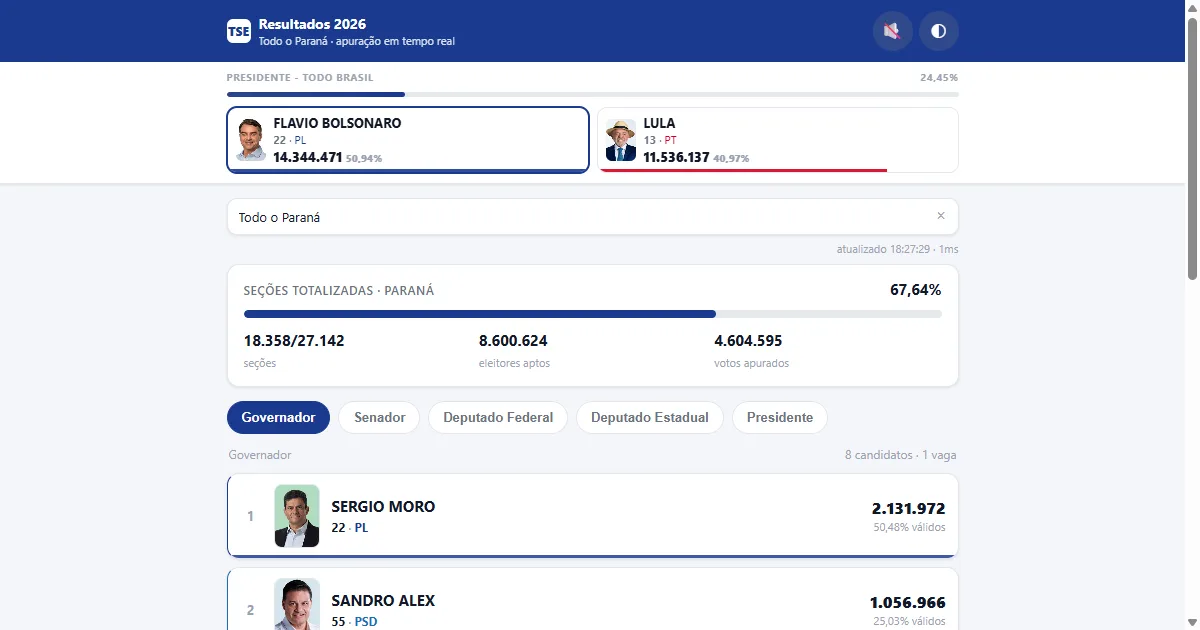
For the 2026 elections I wanted something very simple: open a URL and watch the count come in on screen, the way television shows it. The TSE already publishes the official data as JSON, but inside an official site built for one-off lookups, not for being left open on a tab all night while the numbers move.
This is a write-up of how I built an independent viewer on top of the Tribunal’s public data (and, more importantly, of where the file addresses came from). It covers the whole country, by state and by municipality, and it is live at https://apuracao.nullcomma.com.
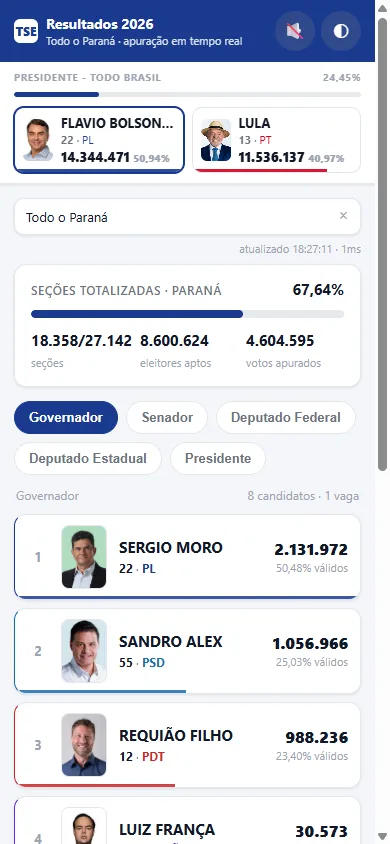 A real screenshot of the interface in the light theme, already with live count data.
Finding the endpoints: the official Angular bundle
There is no public documentation for the resultados.tse.jus.br API. Instead of guessing file names and election codes, I took the JavaScript bundle published by the TSE’s official site and searched it for URL literals. That is where the path templates live, with uf, cargo and eleicao interpolated by the Angular application.
The election codes came from the cycle’s master config, oficial/comum/config/ele-c.json, which is the election catalog. The 2026 election has two entries that matter:
| code | scope | data folder | offices |
|---|---|---|---|
6257 | federal | dados/br | President |
6259 | state | dados/<uf> | Governor, Senator, Federal Deputy, State Deputy |
The file name is a template with zero-padded fields: the office with 4 digits, the election with 6.
/oficial/ele2026/<eleicao>/dados/<pasta>/<pasta><mun>-c<cargo>-e<eleicao>-u.json
In practice, these are the five offices the app shows:
| office | election code | office id | example (Paraná) |
|---|---|---|---|
| President | 6257 | 1 | 6257/dados/br/br-c0001-e006257-u.json |
| Governor | 6259 | 3 | 6259/dados/pr/pr-c0003-e006259-u.json |
| Senator | 6259 | 5 | 6259/dados/pr/pr-c0005-e006259-u.json |
| Federal Deputy | 6259 | 6 | 6259/dados/pr/pr-c0006-e006259-u.json |
| State Deputy | 6259 | 7 | 6259/dados/pr/pr-c0007-e006259-u.json |
One detail only shows up if you read the path carefully: the President at state-wide scope does not live in the state folder, it lives in br. Every other office follows the state folder. The President at municipal scope, on the other hand, uses the state in the path:
- Governor in Campinas/SP (
62910):6259/dados/sp/sp62910-c0003-e006259-u.json - President in Curitiba/PR (
75353):6257/dados/pr/pr75353-c0001-e006257-u.json
So at municipal scope the municipality code goes into the prefix of the file name, and the folder is always the state, whatever it is, including for President.
The full municipality list comes from a different config, 6259/config/mun-e006259-cm.json, and yields all 5,571 municipalities in Brazil. That is the dictionary feeding the search.
The candidate photos come from the same host, on a third path: oficial/ele2026/<eleicao>/fotos/<uf>/<sqcand>.jpeg, with br for President and the state code for the other offices. <sqcand> is the sequential id that comes on every candidate in the JSON, so photo and candidate are tied together by the same number. These are the official TSE images, and the app only relays them through its own proxy: no photo comes from a social network or a third-party crop.
The JSON shape and what I extract
The file is nested four levels deep, and it is worth spelling out because each level means something political, not just structural:
carg → agr (grouping / coalition) → par (party) → cand (candidate)
From the candidate I read sqcand (the photo key), n (ballot number), nmu falling back to nm (ballot name and full name), vap (votes), pvap (percentage, which arrives as "33,82": a string with a comma, not a number), and the result fields e and st (the e field is misleading; see the section on who got elected below). From the coalition, agr.nm; from the party, par.sg for the abbreviation.
From the progress block, which matters most for judging whether a number is trustworthy: s.ts and s.st (total and counted sections), s.pst (counted percentage), e.te (electorate), e.est (counted electorate), v.tvn (valid votes) and v.tv (total votes). dg and hg give the file’s generation date and time.
pvap was a silent bug in the first version: I parsed it directly and got zero for every candidate, with no error at all. Parsing a comma string as if it were a number does not throw; it just returns NaN.
Who got elected, and the trap in the e field
The obvious field for who won is e, which the TSE’s own documentation cites (it is “filled with ‘n’ from the first file generation”). I was about to use it directly. Measuring against the already-closed files showed it is treacherous: e = "s" does not mean “elected”, it means “not eliminated”. In the Federal District, the two front-runners for governor both came back with e = "s" and st = "2º turno". A candidate who merely qualified for the runoff gets the same "s" as the first-round winner.
The field that actually answers it is st, the status in text. Measuring the closed files, it takes five values: "Eleito", "Eleito por QP" and "Eleito por média" (first-round winner), "2º turno" (qualified) and "Não eleito". The app’s rule became: st starting with “Eleito” gets the ELEITO badge; st containing “turno” gets the 2º TURNO badge. The e field is ignored for the badge.
The TSE only fills st when it closes that office’s count, and at that point the file’s top level carries and = "f". While the count runs, st is empty and no badge shows. That is not a bug: it is the Tribunal not having closed it yet.
A scope gotcha: the per-state President file closes (and = "f") but carries no st at all. The President’s decision is national, so the state breakdown flags nobody. The national file does, 6257/dados/br/br-c0001-e006257-u.json.
On screen this became two small things: a green ELEITO badge (or an amber 2º TURNO) on the card, and the office header switching to “apuração encerrada” (count closed). The ballot-box confirmation tone only fires for ELEITO, never for a runoff qualifier.
The server: one dependency-free server.js
The entire backend is a single file with zero external dependencies: only http, fs, path, crypto and Node’s global fetch. It does three things: normalize the TSE JSON into a stable shape for the front end, serve a snapshot API, and proxy the photos.
Normalization flattens the three nesting levels into a flat candidate list and already resolves the photo path, so the front end never has to build a third-party URL:
// server.js - the part that decides the file path
function fileFor(race, uf, mun) {
  const folder = (race.nivel === 'federal' && !mun) ? 'br' : uf;
  const prefix = mun ? String(mun) : '';
  const c = String(race.cargo).padStart(4, '0');
  const e = String(race.eleicao).padStart(6, '0');
  return `/oficial/${CICLO}/${race.eleicao}/dados/${folder}/${folder}${prefix}-c${c}-e${e}-u.json`;
}
The API is small:
GET /api/snapshot?uf=sp&mun=<cd>: the five offices for that place (withoutmun, the whole state)GET /api/municipios: the 5,571 municipalities and the state listGET /api/reverso?lat=&lon=: approximate city from coordinatesGET /api/geoip: approximate city and state from the visitor’s IPGET /api/foto?e=6259&uf=pr&id=<sqcand>: candidate photo proxyGET /api/versionandGET /api/health: build id and health check
The snapshot fetches the five offices with Promise.allSettled, not Promise.all. The difference matters in practice: during the count the TSE returns 404 for files it has not published yet, and with Promise.all one missing office would take the whole screen down. With allSettled, whatever is missing goes into an erros array and the rest renders normally.
Having read that code, I noticed the RACES array is the only configuration table the application has: election code, office id, level (federal or state), name and number of seats come from there, and the rest of the server is generic.
Two small defenses worth mentioning: the static file path is normalized and checked before reading, so a relative path cannot escape the public folder, and every input parameter is regex-validated before it becomes a path: uf with /^[a-z]{2}$/, mun with /^\d{5}$/, and the photo id with /^\d{6,}$/.
Near-real-time: where the ceiling is
The client polls every 2 seconds (adjustable from 2 to 30), and the server keeps a 1.2-second in-memory cache per URL. Each request to the TSE also carries a nocache=<timestamp> in the query string, otherwise an intermediary CDN hands me stale JSON and the app looks broken without being broken.
And here it is worth being honest with the reader: the app is not faster than the source. No polling trick, cache or proxy conjures a vote the TSE has not published yet. The ceiling is the Tribunal’s disclosure cadence. What the cache and the proxy actually buy is something else, and it is real: 40 people watching Curitiba on the same address result in one request to the TSE every 1.2 seconds instead of 40.
That is also why the default polling interval is 2 seconds and not 500 ms: anything faster is only extra load on a public server I do not control.
Before 17:00 there is nothing to show. The screen says exactly that, instead of displaying a silent zero that looks like a result.
The interface
Mobile-first for real: a single column capped at 760 px, viewport-fit=cover, wrapping office chips, large touch targets. Light theme by default with a dark toggle (the ◐ button, preference stored in the browser).
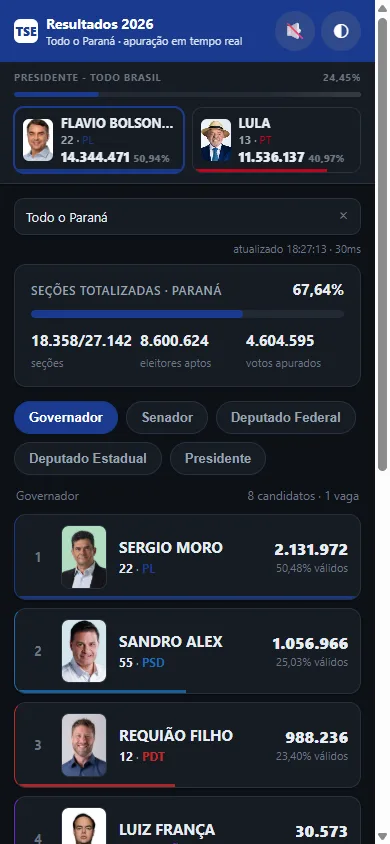 The same layout in the dark theme. The photos are the official ones, served through the proxy.
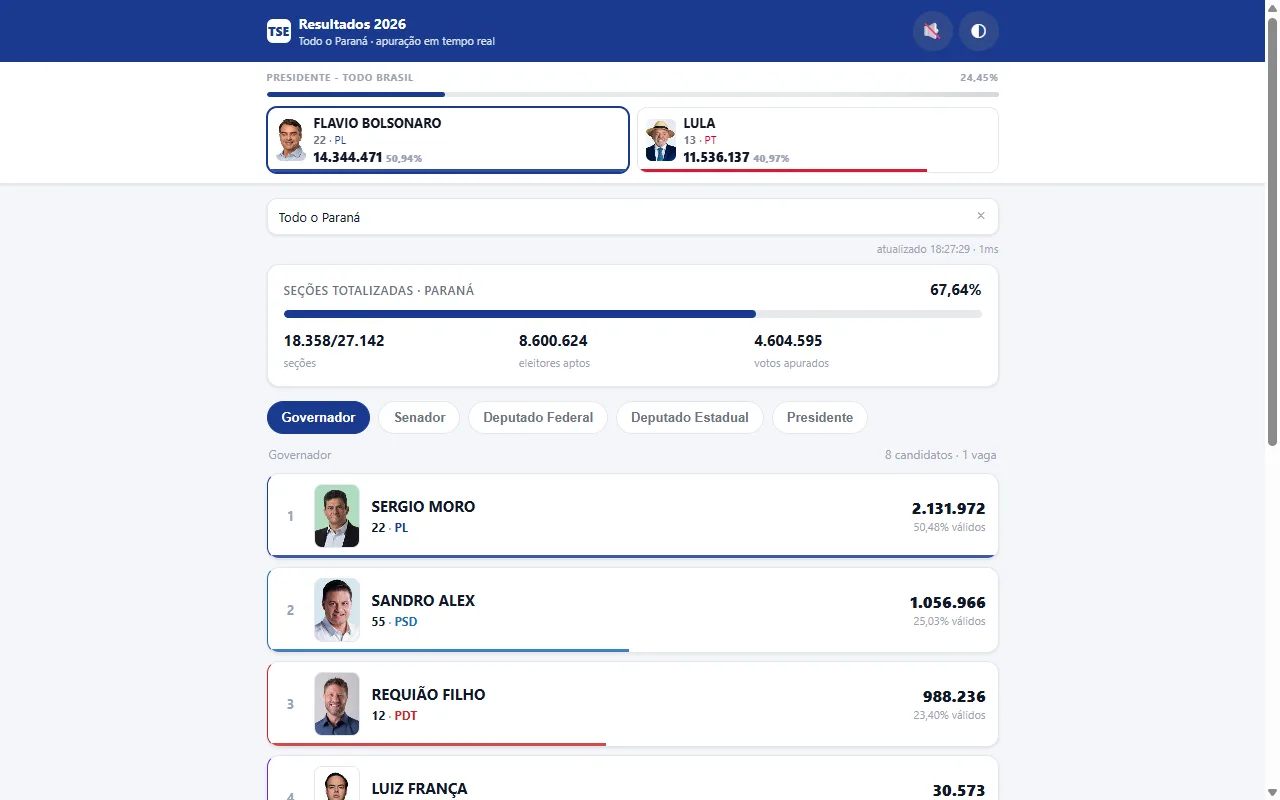 On desktop (regular web): the fixed Brazil widget on top, the app color following the race leader, and the list ordered by votes.
Every candidate appears with the official photo and the party color on the border and the vote bar. On top of that, the app’s own color (header, active chip, bars) takes the party color of whoever leads the selected office, with the header text flipping between black and white based on relative luminance so it never becomes unreadable. With no votes or a tie, it falls back to the default green. Cards keep each candidate’s own party color, so the progress bar and the identity of whoever is ahead stay readable even with the entire app wearing the leader’s color.
Pinned below the header, a fixed widget always shows the two most-voted Presidents, updating continuously. When the President tab is selected the widget hides, so the same information is not duplicated.
City search and automatic location
A single text field searches all 5,571 municipalities in the country, ignoring case and accents, and shows at most 8 suggestions with the state abbreviation next to them (Bom Jesus · GO, Curitiba · PR), because city names repeat a lot in Brazil and the abbreviation is what disambiguates them. Typing a state name also offers Todo o <estado>, the state-wide view.
Matching is approximate in three graded steps, with scoring: prefix match (100), contains (60), or a character subsequence: ctba finds Curitiba (20). Everything is normalized with NFD before comparing.
Automatic location tries the device GPS and falls back to IP-based location if it is denied. Coordinates → city comes from reverse geocoding on Nominatim; the IP path is a single query. The choice is stored, so nobody is asked twice.
Reordering without flickering: keyed DOM + FLIP
This was the front-end detail that mattered most. Every 2 seconds the list reorders itself, because the votes change. The naive implementation (rebuilding the whole list) makes everyone’s photo reload on every update, and the result is an interface that flickers constantly even while the numbers climb.
The fix was keeping a Map of DOM nodes keyed by the candidate’s ballot number and reusing each card. When a candidate shows up again, the same element is updated in place; the photo gets its src assigned once and never again. That alone kills the flicker.
The cards move using the FLIP technique: before reordering, measure each card’s getBoundingClientRect().top; reorder in the DOM; measure again; apply the inverse offset as a translateY with no transition; and on the next requestAnimationFrame, release the transition to translateY(0). The browser animates from the old position to the new one, and the list looks like it slides instead of jumping.
Office chips are reused by signature too: if the id list has not changed, nothing is rebuilt. Same economy of work, one level up.
One detail that can be unwelcome: it plays when the first place of the selected office changes, comparing numero|partido against the previous leader, and it is off by default. The 🔊 button in the header turns it on, and the click also unlocks audio: every browser requires a user gesture before playing audio, so one click solves both.
The sound is a 440 Hz WAV synthesized by a small script of my own, tools/gen-sounds.js, which writes the RIFF header byte by byte and builds the wave as a sine under an exponential envelope. No library, no third-party sample: the point was not to depend on an external audio file that could disappear from the deploy.
And there is the Wake Lock API, so the screen does not turn off mid-count: on by default, with a button to turn it off, and the lock is re-acquired when the tab becomes visible again. On a browser without support, it becomes a silent no-op.
Operating during the count
Two practical problems that only show up once the app is live at 17:00 on a Sunday.
The first is fixing code while people are watching. The server computes a build id (a short hash of the binary and the front end) and exposes it in /api/version, /api/health and inside the snapshot itself. The client stores that value; when it changes, the page saves the scroll position, waits 700 ms and reloads itself, picking up the new code. When the build does not change (a crash and restart, say), there is no reload at all: the screen does not flicker for nothing in the middle of the count.
The reload preserves what matters. The selected tab lives in localStorage, and the scroll position goes to sessionStorage on the pagehide event, which makes it survive a plain F5 and normal navigation too, not just the automatic reload. After coming back, scroll restoration retries up to 14 times at 250 ms intervals, because on the first frame the layout may not have its final height yet.
The second problem is the address. A quick Cloudflare tunnel generates a random URL on every boot, which is great for testing and terrible for anyone saving the link. The answer was to fix the name: the address stopped being drawn at random on every boot and became the same one every time. The hotfix flow is edit, ship again, and the link does not change.
For deployment, the same process serves both the API and the front end, so it is a single container: nothing to install on the server, listening only on the local interface, with a HEALTHCHECK hitting /api/health.
Where it runs now: from the PC tunnel to a small server
The first version ran on my PC behind the named tunnel and held up all night. Once the count was over, the question became where this should live. The answer was a small server, 1 GB of RAM, that was already there and now shares the machine with the rest.
The detail that matters is how the app got there. The Docker image is built here, where the machine is strong, and only the artifact travels: docker save, scp, docker load. The server never installs Node, never runs npm install, never compiles anything. The compose file over there has two lines that matter: the image and the internal network the proxy already uses.
Measured on the server: the container sat between 30 and 40 MB of RAM, with idle CPU close to zero. Exposure is a reverse proxy that points the subdomain at the container and handles TLS.
The PC tunnel is out of the picture. It stays documented as a rollback, but the origin is the server now.
Then came the Go rewrite. The server is pure stdlib, so the port went straight, and the side-by-side comparison of the two (same JSON, across the same 7 scopes, list order included) came out identical. What changed was the weight: the image dropped from 238 MB to 10.4 MB, the transfer payload from 58 MB to 3 MB, and container RAM landed between 12 and 22 MB at rest. On a 1 GB box that is still going to take more services, that is the difference that counts. The server.js stays in the repository as a reference and as a way back.
The first day in production brought a scare worth writing down: the container started restarting on its own, 28 times, with the kernel killing the process over memory. The cause was not the size of the service, it was the cache. I was keeping the parsed TSE JSON in memory, in a map with no ceiling, and a 500 KB file turns into about 5 MB once it becomes a data structure. A crawler walking all 853 municipalities of Minas Gerais created a new entry per municipality, and with the container’s 64 MB limit the result was an OOM loop. The fix was to store the raw body with a byte budget and LRU eviction, parse per request, and cap the runtime heap. Measured after, with the same crawler hammering it: 31 MB and zero restarts.
Honest limits
Add up the three things this app is not:
- The data exists when the TSE publishes it. There is no way to anticipate a vote, and before 17:00 the screen is empty for a good reason.
- We are not faster than the source. The 2-second polling interval is just the cheapest way to mirror the disclosure cadence; a shorter interval only adds load to a public server.
- Party colors are approximate visual support, a color map I put together so the bar is readable at a glance. It is not official party identity and should not be treated as a trademark.
The data is official TSE data. This is an independent viewer, with no link whatsoever to the Superior Electoral Court.
If you want to see the file format I read to build this, it is the same structure in every state and municipality: resultados.tse.jus.br/oficial/ele2026/ plus the path from the table at the top. Any text editor and curl handle the rest.